Glass Chat Stack
Frosted-glass chat with Twitch emotes, badges and auto-fade. Hides bots and !commands.
A chat overlay for Twitch and OBS
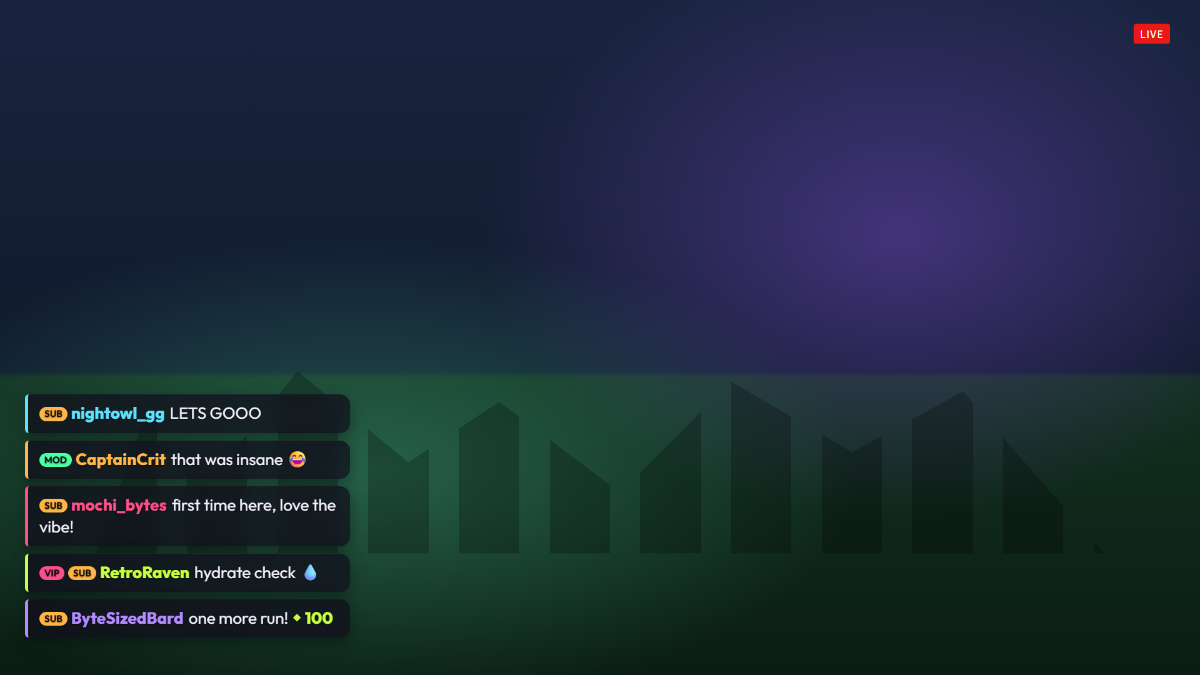
Glass Chat Stack puts your Twitch chat on stream as a column of frosted-glass bubbles in the bottom-left corner. Each message is tinted with the chatter's own Twitch name color, shows mod, sub, VIP and broadcaster badges, and renders Twitch emotes inline.
It is built to stay out of the way: old messages fade after 30 seconds, only the newest few are kept on screen, and messages from Nightbot, StreamElements, Streamlabs or anything starting with ! are hidden so command spam never reaches your viewers.
- Twitch emotes rendered inline
- Mod, sub, VIP and broadcaster badges
- Chatter name colors from Twitch
- Auto-fade with adjustable timing
- Hides bots and !commands
- Highlights bits sent with a message
Add Glass Chat Stack to OBS in under a minute
- Copy your overlay URL.
Replace YOUR_CHANNEL with your Twitch username:
https://www.overlaify.com/overlays/chat-stack?channel=YOUR_CHANNEL - Add a Browser source.
In OBS Studio, click + under Sources, choose Browser and name it “Glass Chat Stack”.
- Paste the URL and set the size.
Paste the URL, then set Width to
1920and Height to1080. Leave custom CSS empty — the background is already transparent. - Test it before you go live.
Add
&test=1to the URL to fire simulated events, then remove it once it looks right. Tick “Control audio via OBS” if you want the alert sounds on their own mixer track.
Reads your public Twitch chat anonymously, so it works with no login or token. Streamlabs Desktop, Meld and Twitch Studio work too — add it wherever they accept a browser source or URL.
URL options
| Option | Example | What it does |
|---|---|---|
max | &max=7 | Maximum number of messages on screen. |
fade | &fade=30 | Seconds before a message fades out. 0 keeps messages until they are pushed off. |
hidebots | &hidebots=nightbot,streamelements | Comma-separated usernames to hide. |
volume | &volume=0.25 | Sound volume from 0 to 1. |
mute | &mute=1 | Turn sounds off. |
Want a different layout, font or animation? Remix it with AI — describe the change in plain words and get your own version with a new OBS URL.
Make Glass Chat Stack yours
Use it as-is for free, or open it in the AI editor and tell it what to change.