!jump Pixel Runners
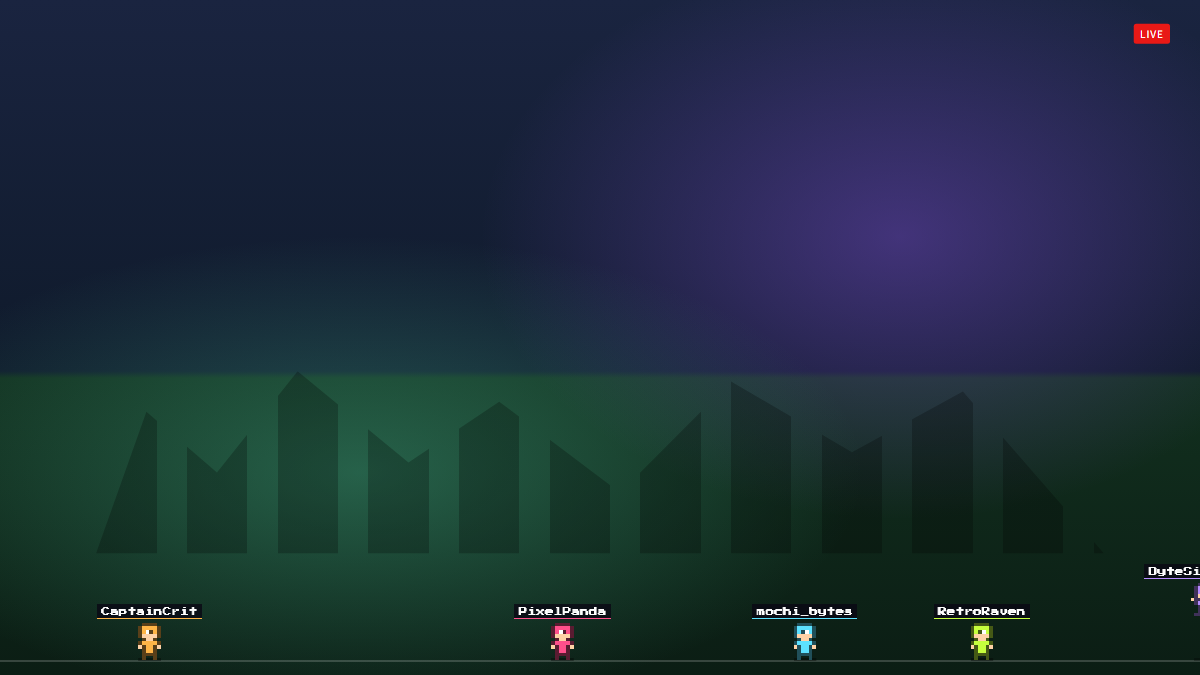
Chatters type !jump and a pixel character with their name runs across the bottom of the screen and jumps.
A chat command overlay for Twitch and OBS
!jump Pixel Runners is a free Twitch chat avatars overlay — a lightweight take on stream avatars with nothing to install. When a viewer types !jump, a little pixel character in their Twitch name color runs across the bottom of your stream with their name above it and jumps along the way.
Typing !jump again makes their runner jump, and up to ten can run at once. It is a simple way to get lurkers to interact, and you can rename the command to anything you like.
- Pixel runner for each chatter who types !jump
- Runner in the viewer's name color with a name tag
- Up to 10 runners at once
- Rename the command
- Jump sound, adjustable or muted
Add !jump Pixel Runners to OBS in under a minute
- Copy your overlay URL.
Replace YOUR_CHANNEL with your Twitch username:
https://www.overlaify.com/overlays/jump-runners?channel=YOUR_CHANNEL - Add a Browser source.
In OBS Studio, click + under Sources, choose Browser and name it “!jump Pixel Runners”.
- Paste the URL and set the size.
Paste the URL, then set Width to
1920and Height to1080. Leave custom CSS empty — the background is already transparent. - Test it before you go live.
Add
&test=1to the URL to fire simulated events, then remove it once it looks right. Tick “Control audio via OBS” if you want the alert sounds on their own mixer track.
Reads chat commands from your public Twitch chat with no login, so anyone in chat can join in. In test mode every simulated chat message spawns a runner. Streamlabs Desktop, Meld and Twitch Studio work too — add it wherever they accept a browser source or URL.
URL options
| Option | Example | What it does |
|---|---|---|
command | &command=!run | Chat command that spawns a runner. |
max | &max=20 | Most runners on screen at once. |
speed | &speed=180 | Running speed in pixels per second. |
volume | &volume=0.25 | Sound volume from 0 to 1. |
mute | &mute=1 | Turn sounds off. |
Want a different layout, font or animation? Remix it with AI — describe the change in plain words and get your own version with a new OBS URL.
Make !jump Pixel Runners yours
Use it as-is for free, or open it in the AI editor and tell it what to change.